How to clip on Xbox, and what to do with a long session
Written by the developer of CutBench, so this is not an independent review.
Press the Xbox button, then X to save the last 30 seconds, or View to save up to the last 2 minutes. Start recording runs up to 10 minutes on internal storage or an hour on external storage. For a longer session, stream it to Twitch, then give the VOD link to CutBench on a Windows PC.
Before you play
Capture to an external drive for recordings of up to an hour
Set the capture location to an external drive. On internal storage a recording stops at 10 minutes; on an external drive it runs up to an hour, depending on the clip resolution and free space. The clip resolution is set on the same screen.
Link Twitch for the long sessions
Link a Twitch account with the QR code; the next steps are in the section on a whole session below.
Save a moment
Press the Xbox button to open the guide, then X to save the last 30 seconds. For a longer stretch, up to the last 2 minutes, press the View button and choose a duration. On the newer Xbox Wireless Controller, holding the Share button records a clip; a single press takes a screenshot.
Record a longer stretch
In the guide, choose Capture & share > Start recording. Depending on the clip resolution and free space, a recording lasts up to 10 minutes on internal storage or an hour on external storage. To end it, open the guide and press X.
Where Xbox game clips go
On the console, Capture & share > Recent captures in the guide lists them. Captures also upload to the Xbox network automatically and show up in the Xbox app on a phone or a Windows PC. The upload can be turned off under Profile & system > Settings > Preferences > Capture & share > Automatically upload.
A whole session into vertical clips
An hour is the most an Xbox records in one go, and an evening of play runs longer. There are two ways to get a whole session to the PC, where CutBench turns it into vertical clips.
| Stream, then the link | A capture card and OBS | |
|---|---|---|
| What you need | a Twitch account | a capture card, OBS on the PC |
| One recording runs | the whole stream | the whole session |
| Who sees it | public on Twitch | only you |
| Extra cost | none | a capture card |
Route 1: stream to Twitch, then paste the link
On Twitch, keep the VOD
Turn on Store Past Broadcasts in the Stream Settings of Twitch’s Creator Dashboard, on the web, before going live. Twitch then keeps the VOD for 7 days, or 14 for Affiliates and 60 for Partners and Prime or Turbo users, so CutBench has to download it before then.
Go live from the guide
In the guide, open Capture & share, choose Live streaming and go live.
Keep the radio low. Twitch mutes stretches of a VOD in which it recognises licensed music, and the radio in GTA games plays licensed songs; a muted stretch gives CutBench less to go on.
Paste the VOD link into CutBench
When the stream has ended, paste the link to its VOD into a new job in CutBench.
CutBench downloads the VOD to the PC, works through the whole recording and ranks the moments into vertical clips.

On Twitch a live broadcast is public, and its VOD is published by default; CutBench needs it to stay published. To keep a session off the internet, a capture card feeding OBS on the PC records it as one file, and CutBench takes that file too.
Route 2: a capture card and OBS
Console into the card’s HDMI IN, the card’s HDMI OUT to the TV, the card’s USB to the PC. Record the session in OBS, then drag the file into CutBench.
Checked on 15 November 2026 on Xbox’s own pages: capturing game clips and live streaming with Twitch; on Twitch’s page on past broadcasts; and in Elgato’s Xbox Series X|S setup guide.
Both routes need a Windows PC, and CutBench is built for an NVIDIA graphics card with 6 GB of VRAM or more; on AMD or Intel Arc graphics it runs on the processor, tens of times slower. Without such a PC, a cloud clip maker that takes a Twitch VOD is the simpler route.
What CutBench gives you
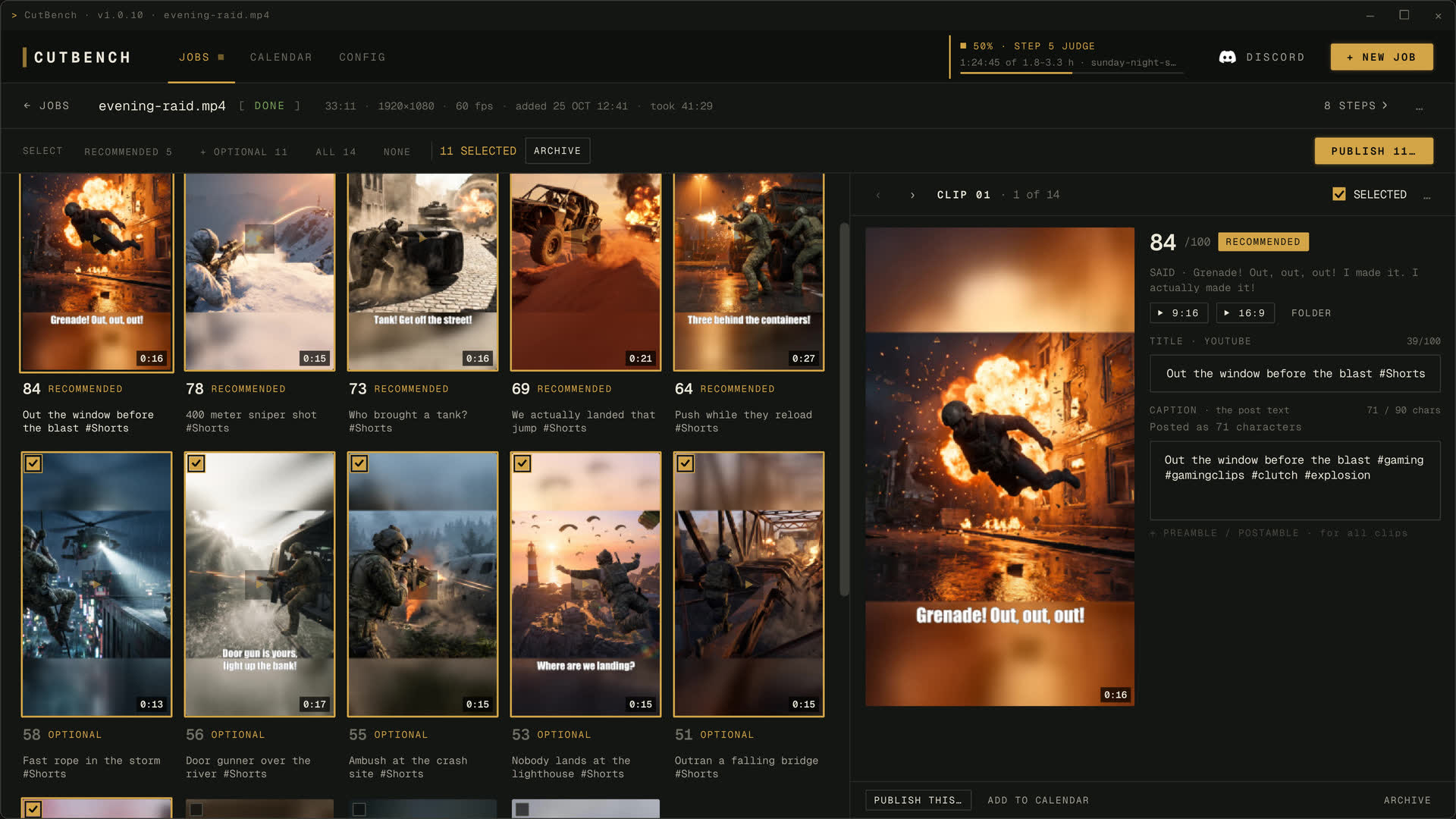
CutBench works through the whole recording and ranks every candidate moment. The top ones become vertical clips with subtitles wherever someone speaks, each with a score and a label: recommended, optional, or skip with a plain reason. On an RTX 3080, a 3-hour recording takes 1 h 53 min to 3 h 28 min, so it is a job to start before bed, not a live tool.
From a 23-minute GTA Online session, most of it riding and driving, CutBench cut two clips, 17 and 12 seconds long. Here the recording and the clips are shortened and without sound. GTA 6 is not out yet; this page will show GTA 6 clips once it is.
Clips that get watched
Our own numbers on length, the first second and loops, from the Shorts on our channel, are on the PS5 page. For GTA, they come down to this: start the clip on the crash, the jump or the shot, not on the drive towards it, and stop it when the moment is over.
When something goes wrong
- A recording stopped at 10 minutes.
- It went to internal storage. Set the capture location to an external drive.
- CutBench can’t open the Twitch link.
- Wait until the stream has ended. Store Past Broadcasts has to have been on before going live, the VOD has to be published and not for subscribers only, and Twitch deletes it after its 7, 14 or 60 days.
- A stretch of the VOD has no sound.
- Twitch muted licensed music; keep the in-game radio low next time.
For console players with a Windows PC and an NVIDIA card, CutBench turns a long session into vertical clips, ranked best first, with subtitles wherever someone speaks.
GTA 6 comes out on Xbox Series X|S on 19 November 2026, as Rockstar’s page for the game gives it: the GTA 6 clipping guide puts both consoles side by side.
Questions people ask
Where are my Xbox game clips?
On the console, under Capture & share > Recent captures in the guide. Once they upload to the Xbox network, also in the Xbox app on a phone or a Windows PC.
How long can an Xbox record?
It saves up to the last 2 minutes, or records up to 10 minutes on internal storage and an hour on external storage.
Can CutBench take an Xbox stream?
Yes, as the Twitch VOD link once the stream ends.